<?xml version="1.0" encoding="UTF-8" ?>
<feed xml:lang="ja" xmlns="http://www.w3.org/2005/Atom" xmlns:dc="http://purl.org/dc/elements/1.1/" xmlns:thr="http://purl.org/syndication/thread/1.0">
  <title type="text">とりあたまログ</title>
  <subtitle type="html">とりあたまの食い散らかし</subtitle>
  <link rel="self" type="application/atom+xml" href="http://chicken3log.ni-3.net/atom"/>
  <link rel="alternate" type="text/html" href="http://chicken3log.ni-3.net/"/>
  <updated>2012-08-06T11:35:42+09:00</updated>
  <author><name>No Name Ninja</name></author>
  <generator uri="//www.ninja.co.jp/blog/" version="0.9">忍者ブログ</generator>
  <atom10:link xmlns:atom10="http://www.w3.org/2005/Atom" rel="hub" href="http://pubsubhubbub.appspot.com/" />
  <entry>
    <id>chicken3log.ni-3.net://entry/40</id>
    <link rel="alternate" type="text/html" href="http://chicken3log.ni-3.net/%E6%9C%AA%E9%81%B8%E6%8A%9E/django%20%E3%81%AE%20model%20%E3%81%AE%E3%83%95%E3%82%A3%E3%83%BC%E3%83%AB%E3%83%89%E3%81%AE%E3%83%AA%E3%82%B9%E3%83%88%E3%81%A8%E5%80%A4%E3%81%AE%E5%8F%96%E5%BE%97" />
    <published>2021-06-22T15:00:58+09:00</published> 
    <updated>2021-06-22T15:00:58+09:00</updated> 
    <category term="未選択" label="未選択" />
    <title>Django の model のフィールドのリストと値の取得</title>
    <content mode="escaped" type="text/html" xml:lang="utf-8"> 
      <![CDATA[get_fields() でモデルに関連付けられたフィールドのタプルが取得できる。<br />
またフィールドの value_from_object(＜モデルインスタンス＞) で指定したインスタンスのフィールドの値が取得できる。<br />
<br />

<pre><code>sample_model = Sample.objects.all().first()
for field in sample_model._meta.get_fields():
    print("{}: {}".format(field.name, field.value_from_object(sample_model))</code></pre>
<h3>参考</h3>
<a href="https://docs.djangoproject.com/en/3.2/ref/models/meta/">Model _meta API | Django documentation | Django</a><br />
<a href="https://docs.djangoproject.com/en/3.2/ref/models/fields/">Model field reference | Django documentation | Django</a>]]> 
    </content>
    <author>
            <name>No Name Ninja</name>
        </author>
  </entry>
  <entry>
    <id>chicken3log.ni-3.net://entry/39</id>
    <link rel="alternate" type="text/html" href="http://chicken3log.ni-3.net/python/django%20-%20selenium%20%E3%81%AE%E3%83%86%E3%82%B9%E3%83%88%E3%81%A7%20st" />
    <published>2021-06-15T10:21:11+09:00</published> 
    <updated>2021-06-15T10:21:11+09:00</updated> 
    <category term="python" label="python" />
    <title>Django + selenium のテストで static ファイルを表示できるようにする</title>
    <content mode="escaped" type="text/html" xml:lang="utf-8"> 
      <![CDATA[django.test.LiveServerTestCase ではなく django.contrib.staticfiles.testing.StaticLiveServerTestCase を使用する。]]> 
    </content>
    <author>
            <name>No Name Ninja</name>
        </author>
  </entry>
  <entry>
    <id>chicken3log.ni-3.net://entry/38</id>
    <link rel="alternate" type="text/html" href="http://chicken3log.ni-3.net/python/python%20%E3%81%AE%E9%85%8D%E5%88%97%20-list-" />
    <published>2020-03-19T07:34:27+09:00</published> 
    <updated>2020-03-19T07:34:27+09:00</updated> 
    <category term="python" label="python" />
    <title>python の配列の初期化</title>
    <content mode="escaped" type="text/html" xml:lang="utf-8"> 
      <![CDATA[<pre><code>list_sample = [1, 3, 2, 5, 4, 2]
print(list_sample)
# [1, 3, 2, 5, 4, 2]

list_sample2 = [i for i in [1, 2, 3]]
print(list_sample2)
# [1, 2, 3]

list_sample2 = [i for i in range(0, 10)]
print(list_sample2)
# [0, 1, 2, 3, 4, 5, 6, 7, 8, 9]

list_sample2 = [i for i in range(0, 10, 2)]
print(list_sample2)
# [0, 2, 4, 6, 8]</code></pre>]]> 
    </content>
    <author>
            <name>No Name Ninja</name>
        </author>
  </entry>
  <entry>
    <id>chicken3log.ni-3.net://entry/37</id>
    <link rel="alternate" type="text/html" href="http://chicken3log.ni-3.net/other/anki%E3%81%A7duo3.0%E3%81%AE%E8%8B%B1%E6%96%87%E3%82%92%E6%9A%97%E8%A8%98%E3%81%99%E3%82%8B" />
    <published>2016-02-25T15:42:41+09:00</published> 
    <updated>2016-02-25T15:42:41+09:00</updated> 
    <category term="その他" label="その他" />
    <title>AnkiでDUO3.0の英文を暗記する</title>
    <content mode="escaped" type="text/html" xml:lang="utf-8"> 
      <![CDATA[<a href="http://ankisrs.net/">Anki</a>という暗記を補助するツールを使って英文を暗記するための準備。<br />

<h3>流れ</h3>
<ol>
<li>Ankiに単語帳の枠を作成する</li>
<li>ノートを作成しフィールド・カードの設定をする</li>
<li>単語帳データを作成する</li>
<li>Ankiに単語帳データを取り込む</li>
<li>音声ファイルを作成する</li>
<li>Ankiに音声ファイルを取り込む</li>
</ol>
<h3>単語帳を作成する</h3>
「単語帳を作成」ボタンをクリックして任意の名前を入力し、OKボタンをクリックする。
<h3>ノートを作成する</h3>
[ツール]&rarr;[ノートタイプを管理]<br />
追加&rarr;基本
<h3>フィールドの設定</h3>
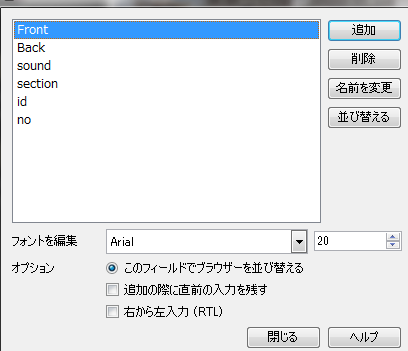
作成したノートを選択して「フィールド」ボタンをクリックする。 sound, section, id, noを追加する。 <br />
<a target="_blank" href="//chicken3log.ni-3.net/File/2016-02-25_142416.png" title=""><img src="//chicken3log.ni-3.net/Img/1456382851/" alt="" /></a>
<h3>カードの設定</h3>
作成したノートを選択して「カード」ボタンをクリックする。
<h4>表面のテンプレート</h4>
入力欄が表示されるようにする。
<pre><code>{{Front}}
&lt;br/&gt;&lt;br/&gt;
{{type:Back}}</code></pre>
<h4>書式</h4>
例。好みで変更する。
<pre><code>.card {
 font-family: Meiryo;
 font-size: 14px;
 text-align: center;
 color: black;
 background-color: white;
}

code#typeans { font-family: Arial; }

#answer { margin-top: 0; }</code></pre>
<h4>裏面のテンプレート</h4>
再生する音声ファイルの名前を指定したりセクションNoを表示したりできる。
<pre><code>{{sound}}
{{no}} {{section}}-{{id}}

&lt;hr&gt;

{{FrontSide}}

&lt;hr id=answer&gt;</code></pre>
<h3>単語帳データ(カード)のテキストファイルを作成する</h3>
タブ区切りで
<ul>
<li>日本語</li>
<li>英文</li>
<li>音声ファイル名(例：[sound:section01_01.mp3])</li>
<li>セクションNo(例：section1)</li>
<li>id(セクション内での通し番号)</li>
<li>no(全体での通し番号)</li>
</ul>
を1行にして560行のデータを作成する。<br />
section, id, noは本をすぐに見返したりするのに使うかもしれないので登録したが好み。消す場合はノートのフィールドや裏面のテンプレートからも削除する。
<h3>カードデータを読み込む</h3>
[ファイル]&rarr;[読み込む]<br />
「種類」に作成したノートが選択されていることを確認する。<br />
「単語帳」には最初に作成した単語帳を選択する。<br />
対応するフィールドが合っているか確認して「読み込む」ボタンをクリックする。
<h3>音声ファイルを作成する</h3>
<a href="http://eigonokai.jp/duo30-splitting-method/" target="_blank">DUO 3.0 CD 分割の方法</a>
<h3>音声ファイルを配置する</h3>
作成したファイルを
<pre><code>(書類, ドキュメントフォルダ)/Anki/(プロファイル名: ユーザー 1)/collection.media</code></pre>
に置く。]]> 
    </content>
    <author>
            <name>No Name Ninja</name>
        </author>
  </entry>
  <entry>
    <id>chicken3log.ni-3.net://entry/35</id>
    <link rel="alternate" type="text/html" href="http://chicken3log.ni-3.net/%E5%9B%B0%E3%81%A3%E3%81%9F/20150409" />
    <published>2015-04-09T13:49:01+09:00</published> 
    <updated>2015-04-09T13:49:01+09:00</updated> 
    <category term="困った" label="困った" />
    <title>bundle installでText file busyというエラーメッセージが表示される</title>
    <content mode="escaped" type="text/html" xml:lang="utf-8"> 
      <![CDATA[<h3>エラー内容</h3>
VM環境で<code>bundle install --path vendor/bundle</code>実行時に下記のようなエラーが出たとき。
<pre><code>
Gem::Ext::BuildError: ERROR: Failed to build gem native extension.

    /home/vagrant/.rbenv/versions/2.2.0/bin/ruby -r ./siteconf20150409-9027-w2urdg.rb extconf.rb
creating Makefile

Text file busy @ unlink_internal - ./siteconf20150409-9027-w2urdg.rb
</code></pre>
<h3>対策</h3>
インストール先をvagrantの共有フォルダではない場所にする。
<h4>フォルダを作成する</h4>
<pre><code>$ mkdir ~/.bundles</code></pre>
<h4>パスを変更する</h4>
プロジェクトの<code>.bundle/config</code>を開きパスを変更してインストールを実行する。
<pre><code>BUNDLE_PATH: "/home/vagrant/.bundles/プロジェクト名"</code></pre>
<pre><code>$ bundle install</code></pre>
または、configファイルを変更する代わりに実行時に指定する。
<pre><code>$ bundle install --path /home/vagrant/.bundles/プロジェクト名</code></pre>]]> 
    </content>
    <author>
            <name>No Name Ninja</name>
        </author>
  </entry>
  <entry>
    <id>chicken3log.ni-3.net://entry/33</id>
    <link rel="alternate" type="text/html" href="http://chicken3log.ni-3.net/%E5%9B%B0%E3%81%A3%E3%81%9F/log4net%E3%81%A7%E3%83%AD%E3%82%B0%E3%81%8C%E5%87%BA%E5%8A%9B%E3%81%95%E3%82%8C%E3%81%AA%E3%81%84" />
    <published>2015-03-25T15:37:42+09:00</published> 
    <updated>2015-03-25T15:37:42+09:00</updated> 
    <category term="困った" label="困った" />
    <title>log4netでログが出力されない</title>
    <content mode="escaped" type="text/html" xml:lang="utf-8"> 
      <![CDATA[AssemblyInfo.cs以下の内容を記載しているか確認する
<pre style="overflow: auto;"><code>[assembly: log4net.Config.XmlConfigurator(Watch = true)]</code></pre>]]> 
    </content>
    <author>
            <name>No Name Ninja</name>
        </author>
  </entry>
  <entry>
    <id>chicken3log.ni-3.net://entry/32</id>
    <link rel="alternate" type="text/html" href="http://chicken3log.ni-3.net/%E5%9B%B0%E3%81%A3%E3%81%9F/visualstudio2010%E3%81%A7%E3%80%8Clog4net%E3%81%8C" />
    <published>2015-03-25T14:16:33+09:00</published> 
    <updated>2015-03-25T14:16:33+09:00</updated> 
    <category term="困った" label="困った" />
    <title>VisualStudio2010で「log4netが見つかりませんでした」というエラーが出るときに確認する</title>
    <content mode="escaped" type="text/html" xml:lang="utf-8"> 
      <![CDATA[プロジェクトを右クリック &rarr; [プロパティ]<br />
[アプリケーション] &rarr; [対象のフレームワーク]で「.NET Framework 4」が選択されていることを確認する。<br />
※.Net Framework 4 Client Profileではなく]]> 
    </content>
    <author>
            <name>No Name Ninja</name>
        </author>
  </entry>
  <entry>
    <id>chicken3log.ni-3.net://entry/31</id>
    <link rel="alternate" type="text/html" href="http://chicken3log.ni-3.net/other/avast%E3%81%AE%E3%83%81%E3%82%A7%E3%82%B9%E3%83%88%E3%81%8B%E3%82%89%E6%88%BB%E3%81%99" />
    <published>2015-02-21T07:46:50+09:00</published> 
    <updated>2015-02-21T07:46:50+09:00</updated> 
    <category term="その他" label="その他" />
    <title>avastのチェストから戻す</title>
    <content mode="escaped" type="text/html" xml:lang="utf-8"> 
      <![CDATA[※avast 2015.10.0.2208<br />
<ol>
<li>[スキャン]&rarr;[ウイルスをスキャン]メニュークリック</li>
<li>[隔離領域(ウイルスチェスト)]リンククリック</li>
<li>ウイルスチェストのリストに表示された該当ファイルを右クリック&rarr;[ファイルを復元して除外リストに追加する]クリック</li>
</ol>]]> 
    </content>
    <author>
            <name>No Name Ninja</name>
        </author>
  </entry>
  <entry>
    <id>chicken3log.ni-3.net://entry/30</id>
    <link rel="alternate" type="text/html" href="http://chicken3log.ni-3.net/other/%E3%83%A1%E3%82%A4%E3%83%AA%E3%82%AA%E3%81%AE%E7%AD%89%E5%B9%85%E3%83%95%E3%82%A9%E3%83%B3%E3%83%88-meiryoke_conso" />
    <published>2015-02-21T06:54:55+09:00</published> 
    <updated>2015-02-21T06:54:55+09:00</updated> 
    <category term="その他" label="その他" />
    <title>メイリオの等幅フォント(MeiryoKe_Console)をインストールしてconsolasと使う</title>
    <content mode="escaped" type="text/html" xml:lang="utf-8"> 
      <![CDATA[※Windows7<br />
<br />

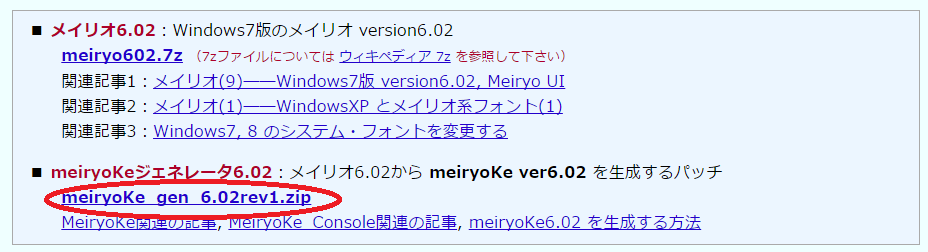
<h3>meiryoKe_gen_6.02rev1.zipをダウンロードする</h3>
<a href="http://okrchicagob.blog4.fc2.com/blog-entry-169.html">ブログ内記事で取りあげたソフト・ファイルのＤＬ情報 『ことば・その周辺』</a><br />
<a href="http://web1.nazca.co.jp/hp/nzkchicagob/m6x9801/mrktb3br7.html">メイリオ・メイリオ改・meiryoKe・ttfname3</a><br />
<br />
<img src="//chicken3log.ni-3.net/File/2015-02-21_060925.png" alt="" />
<h3>フォントファイルをコピーする</h3>
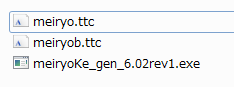
「C:\Windows\Fonts」にある「Meiryo UI」をmeiryoKe_gen_6.02rev1.zipを解凍してできたフォルダにコピーする。(コピー&amp;ペーストするとmeiryo.ttcとmeiryob.ttcになる)<br />
<img src="//chicken3log.ni-3.net/File/2015-02-21_062947.png" alt="" />
<h3>フォントをインストールする</h3>
meiryoKe_gen_6.02rev1.exeを実行して生成されたファイルを「C:\Windows\Fonts」にコピーする。<br />
<br />
単体で使う場合はここまでで終わり。
<h3>consolasとMeiryoKe_Consoleをリンクする</h3>
※この作業は最後に再起動が必要になる<br />
<ol>
<li>レジストリエディタを起動する(事前にバックアップ取ったりしておく)</li>
<li>「HKEY_LOCAL_MACHINE\SOFTWARE\Microsoft\Windows NT\CurrentVersion\FontLink\SystemLink」に新しい値を追加する
<table>
<tbody>
<tr><th></th>
<td>複数行文字列値</td>
</tr>
<tr><th>名前</th>
<td>Consolas</td>
</tr>
<tr><th>値のデータ</th>
<td>meiryoKe_602r1.ttc,MeiryoKe_Console</td>
</tr>
</tbody>
</table>
</li>
<li>PCを再起動する</li>
</ol>]]> 
    </content>
    <author>
            <name>No Name Ninja</name>
        </author>
  </entry>
  <entry>
    <id>chicken3log.ni-3.net://entry/28</id>
    <link rel="alternate" type="text/html" href="http://chicken3log.ni-3.net/%E5%9B%B0%E3%81%A3%E3%81%9F/iphone%E3%81%AE%E9%9F%B3%E5%A3%B0%E5%85%A5%E5%8A%9B%E3%83%9C%E3%82%BF%E3%83%B3%E3%82%92%E6%B6%88%E3%81%99%20-ios8-" />
    <published>2014-12-11T09:51:46+09:00</published> 
    <updated>2014-12-11T09:51:46+09:00</updated> 
    <category term="困った" label="困った" />
    <title>iPhoneの音声入力ボタンを消す (iOS8)</title>
    <content mode="escaped" type="text/html" xml:lang="utf-8"> 
      <![CDATA[<h3>日本語キーボードの左下に表示されているマイクの絵のボタンを非表示にしたい</h3>
[設定] &rarr; [一般] &rarr; [キーボード] &rarr; [音声入力]<br />
ここでオフにする]]> 
    </content>
    <author>
            <name>No Name Ninja</name>
        </author>
  </entry>
</feed>